Options P&L in 60 seconds
Options payoff questions keep asking for the same three numbers: max gain, max loss and breakeven. The sprint drills exactly that. Price as many positions as you can in 60 seconds, and see the payoff chart and the working after every one.
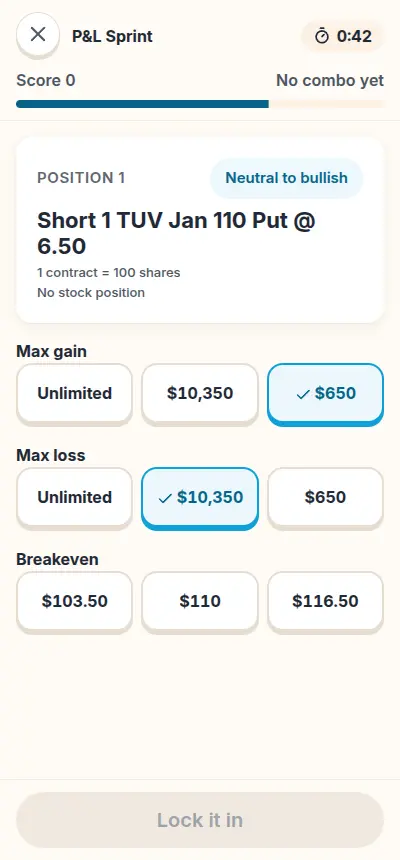
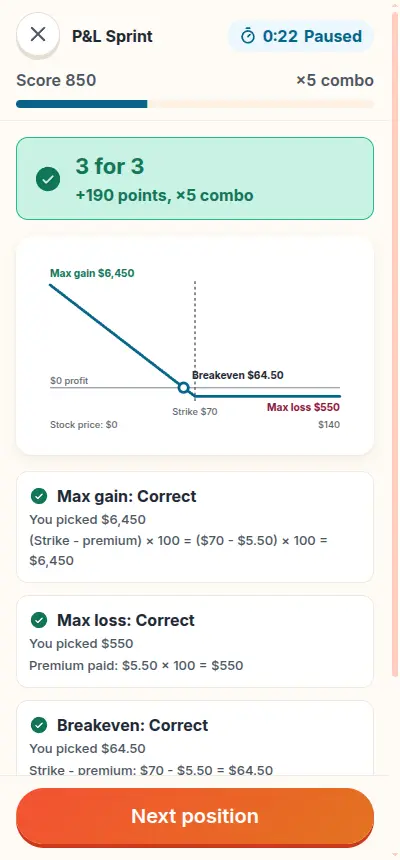
the clock pauses while you read each answer
max gain, max loss and breakeven
one right, two common mistakes
up to 10 full sprints a day
Each position reads like an exam question: "Short 1 TUV Jan 110 Put @ 6.50," one contract of 100 shares. For each of the three numbers, tap one of three tiles. One is right. The other two are common mistakes, like using the strike alone as the breakeven, adding the premium on a put, or calling a capped side Unlimited.
Lock it in and the answer screen opens with the clock paused. Tap Next position when you are ready, and the clock picks up where it left off. When it hits zero, the sprint is over.
Every position in the sprint is one of these four. Learn the table, then let the sprint test it until you can price a position without thinking. The memory tip the app gives you: Calls Up, Puts Down. A call's breakeven adds the premium to the strike, and a put's breakeven subtracts it.
| Position | Outlook | Max gain | Max loss | Breakeven |
|---|---|---|---|---|
| Long call | Bullish | Unlimited | Premium × 100 | Strike + premium |
| Short call (uncovered) | Neutral to bearish | Premium × 100 | Unlimited | Strike + premium |
| Long put | Bearish | (Strike − premium) × 100 | Premium × 100 | Strike − premium |
| Short put | Neutral to bullish | Premium × 100 | (Strike − premium) × 100 | Strike − premium |
Long 1 XYZ Jan 70 Put @ 5.50
- Max gain $6,450: the stock falls to zero, so (strike − premium) × 100 = ($70 − $5.50) × 100
- Max loss $550: the premium paid, $5.50 × 100
- Breakeven $64.50: strike − premium, $70 − $5.50
See the shape of the trade
After every position, a payoff chart marks the max gain, max loss, breakeven and strike, so the numbers stop being formulas and start being a picture you remember.
Check the math, not just the answer
Each number comes with its working, like "Premium paid: $5.50 × 100 = $550," plus a memory tip for that position.
Your misses come back
Any position you miss goes into a review queue. It comes back the next day, then on a spaced schedule, until it sticks.
Chase a personal best
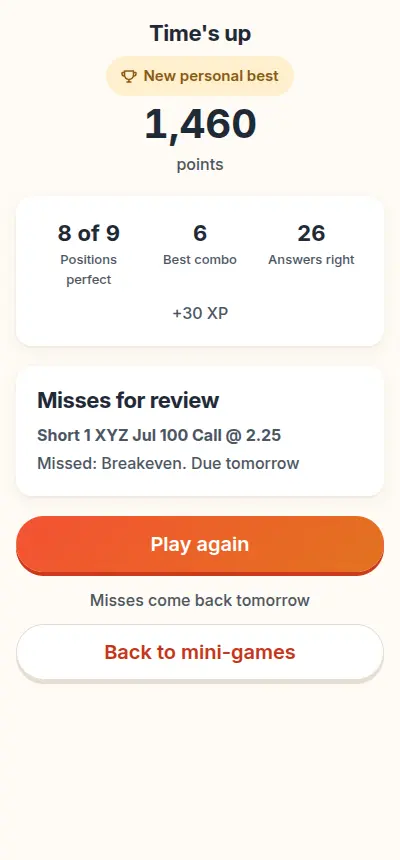
Every right number scores points, and fully right positions build a combo. A full sprint earns 30 Study XP, up to 10 sprints a day, so playing counts even on an off day.
The sprint is most useful for the Series 7, Series 65 and Series 66, where it is included with your course. The SIE covers the same basics, so SIE students can benefit too, and there it is free for every signed-in student.
Series 7
Options are a big part of the Series 7, and these four positions are the foundation for every strategy that builds on them.
Series 65
The Series 65 tests options alongside other derivatives. The sprint keeps the payoff math sharp without a full review session.
Series 66
The Series 66 tests the same basic positions. A few sprints are a quick way to lock in the formulas.
SIE
The SIE covers the same basics, so SIE students can benefit too, and the sprint is free there for every signed-in student.
Single options are available now. Spreads and straddles show as coming soon in the app.
What is the Options P&L Sprint?
It is a 60-second mini-game inside the CertFuel app. You see an option position, such as "Long 1 XYZ Jan 70 Put @ 5.50," and pick its max gain, max loss and breakeven from three tiles each. Lock in your answers, see the explanation, and move to the next position until the clock runs out.
Does the clock keep running while I read the answer?
No. The clock runs only while a position is on screen. After you lock in, the answer screen shows a payoff chart, the working for each number and a memory tip, and the clock pauses until you tap Next position.
Which positions does it cover?
The first version covers single options: long calls, short (uncovered) calls, long puts and short puts, one contract of 100 shares each. Spreads and straddles are shown in the app as coming soon.
How is the score calculated?
Each right number scores 50 points. When all three numbers on a position are right, your combo grows and adds 10 extra points per step, with the bonus capped at a ×10 combo. A miss on any number resets the combo. The server checks every answer, and your personal best, accuracy and best combo are saved.
Do I earn XP in the sprint?
Yes. A full sprint, played until the clock runs out with at least four positions answered, earns 30 Study XP, up to 10 sprints a day. XP rewards the time you put in, not a perfect score, and a sprint you leave early earns none. Reviewing a missed position when it comes due earns 10 XP, up to 20 reviews a day.
What happens to the positions I miss?
They go into a review queue. A miss comes back the next day, and the queue spaces them out from there: get it right and it returns later, miss it again and it comes back sooner.
Which courses have the Options P&L Sprint?
Series 7, Series 65, Series 66 and SIE. It is most useful for the Series 7, 65 and 66, where it is included with your course. The SIE covers the same basics, and there the sprint is free for every signed-in student. Open Mini-games from the More menu in the app.
Don't see your question answered here? We'd love to help. Get in touch with us.